If someone on your team already models a system in a simulation tool, there's a good chance
you can use that model directly with RemotiveTopology. The fmu module in the RemotiveTopology
Python framework lets you load the exported FMU, connect it to the signals on your virtual
buses, and run it next to everything else in the topology.
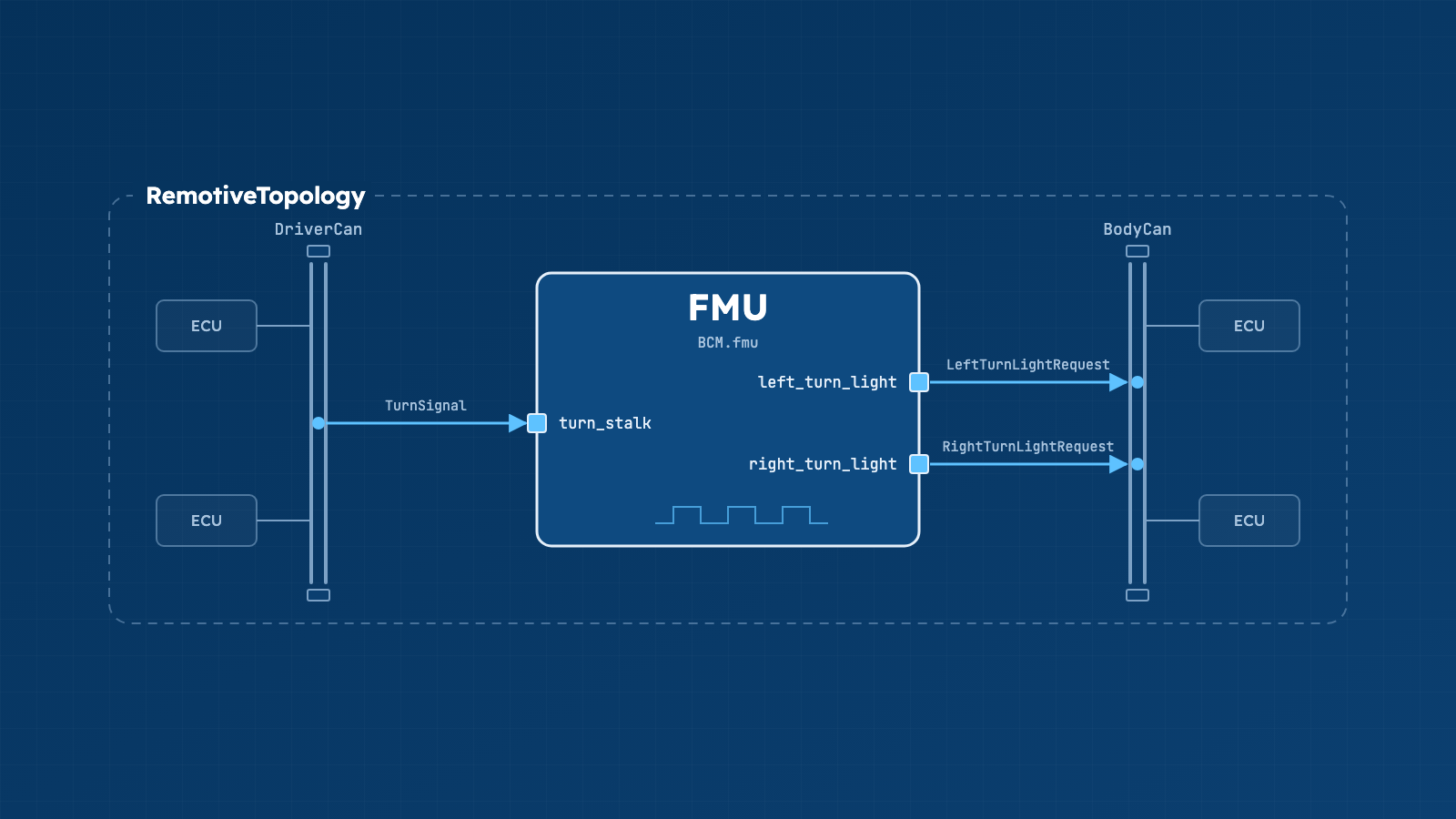
The code in this post is a slice of the RemotiveCar example, where the body control module (BCM) runs as an FMU. It only maps the turn stalk signals as input and the left and right turn lights signals as output, which keeps it small enough to reason about. For the complete, runnable setup, with every input and output mapped, see the FMU use case in the examples repository.
What an FMU is and when you would use one
A Functional Mock-up Unit is a packaged simulation model, following the Functional Mock-up Interface (FMI) standard, that many modeling tools can export. It's a zip file with a model description (the inputs, outputs, and default experiment settings) and the compiled model.
An FMU can represent a complete ECU or one of its software components. It can also model physical systems affected by the ECU, such as power consumption or vehicle dynamics, to simulate the effects of the ECU running. In either case, models react to what's on the bus and produce realistic outputs. The RemotiveTopology Python API provides a straightforward way to connect an FMU to RemotiveTopology.
Prerequisites
You need a working RemotiveTopology setup with Docker (or Podman), RemotiveCLI with an active subscription, and Python 3.10 or later for behavioral models, as described in Install.
FMU support is an optional dependency of remotivelabs-topology, called fmu. It needs
fmpy and numpy, which are large and normally not needed, so they're only
installed when you ask for them:
pip install remotivelabs-topology[fmu]
Then the FMU itself. The framework drives the model one step at a time, so it needs to be:
- an FMI 2.0 or 3.0 Co-Simulation FMU,
- configured with a fixed step size and no internal solver,
- carrying a
defaultExperimentin its model description (that's where the step size is read from).
If the FMU doesn't support co-simulation or lacks a default experiment, loading it fails with an error straight away, which is a nice early warning.
Loading the FMU from Python
The entry point is FMUSimulation. Give it a path, and it reads the model description,
instantiates the FMU and resets it to its initial state:
from pathlib import Path

from remotivelabs.topology.fmu import FMUSimulation

fmu = FMUSimulation(Path("BCM.fmu"))
fmu.print()  # dump model information and variables

print(fmu.step_size)
print(fmu.input_var_names)
print(fmu.output_var_names)
print() is a good first thing to run on a new FMU: it shows the variable names you'll need
in the next step. For the BCM, that includes the turn_stalk input and the
left_turn_light and right_turn_light outputs. The step size comes from the default
experiment, 50 ms for the BCM, but you can override it with
FMUSimulation(path, step_size=0.01) (step time given in seconds).
Each call to await fmu.step() advances the simulation by one step, applies the current
inputs and returns the outputs. You can also set an input directly with
fmu.set_input_value("name", value); it sticks for all future steps, and an unknown name
raises a ValueError.
Mapping FMU inputs and outputs to signals
The FMUBehavioralModel class connects an FMUSimulation to the topology. Inputs are
described with an InputMapping, a nested dictionary from namespace, to frame, to signal,
to FMU input name. Namespaces are named <ECU>-<Channel>, as described in
Namespaces, and signal names
include their frame, as in TurnStalk.TurnSignal.
The BCM reads the turn stalk position from the TurnStalk frame on DriverCan and feeds it
to the FMU's turn_stalk input:
from remotivelabs.topology.fmu import InputMapping

input_mapping: InputMapping = {
    "BCM-DriverCan": {
        "TurnStalk": {
            "TurnStalk.TurnSignal": "turn_stalk",
        },
    },
}
Whenever a TurnStalk frame arrives, the model writes the value of TurnStalk.TurnSignal
(0 for off, 1 for left, 2 for right) to turn_stalk. Values outside the signal's min and
max in the signal database, 0 to 2 here, are ignored, so a bad frame doesn't push the model
into nonsense.
Outputs go the other way. FMUSimulation takes an on_output callback that runs after
every step with a dictionary of output values. A simple way to put them on the bus is to
let a restbus send the ECU's frames and update their signals from the callback. For the
BCM, the restbus sends its frames on BodyCan, and the callback updates the turn light
signals in the TurnLightControl frame:
from remotivelabs.topology.namespaces import filters
from remotivelabs.topology.namespaces.can import CanNamespace, RestbusConfig

body_can = CanNamespace(
    "BCM-BodyCan",
    broker_client,
    restbus_configs=[RestbusConfig([filters.SenderFilter(ecu_name="BCM")])],
)

async def on_output(outputs):
    await body_can.restbus.update_signals(
        ("TurnLightControl.LeftTurnLightRequest", int(outputs["left_turn_light"])),
        ("TurnLightControl.RightTurnLightRequest", int(outputs["right_turn_light"])),
    )
The output values have the Python type that matches the FMU variable's type: bool for
Boolean, int for Int32 and Integer, float for Float64 and Real. Signals on the
bus are numbers, so convert where the types don't line up. The turn lights are Boolean
outputs that drive 0/1 signals, so they're sent as int(...). An output that drives a
physical value, such as the steering wheel angle in the full example, is sent as
float(...).
Notice that the Python code doesn't blink the lights. That's the FMU's job: while the stalk
is in the left position, left_turn_light switches on and off by itself, with a cycle time
set by the FMU's cycle_time parameter.
Running it as part of a topology
Putting it together, the model script looks much like any other behavioral model.
run_forever() starts a ticker at the FMU's step size, steps the simulation on every tick
and handles inputs and control requests at the same time:
import asyncio
from pathlib import Path

from remotivelabs.broker import BrokerClient
from remotivelabs.topology.cli.behavioral_model import BehavioralModelArgs
from remotivelabs.topology.fmu import FMUBehavioralModel, FMUSimulation
from remotivelabs.topology.namespaces import filters
from remotivelabs.topology.namespaces.can import CanNamespace, RestbusConfig


FMU_PATH = Path(__file__).parent / "BCM.fmu"


async def main(args: BehavioralModelArgs):
    async with BrokerClient(url=args.url, auth=args.auth) as broker_client:
        driver_can = CanNamespace("BCM-DriverCan", broker_client)
        body_can = CanNamespace(
            "BCM-BodyCan",
            broker_client,
            restbus_configs=[RestbusConfig([filters.SenderFilter(ecu_name="BCM")])],
        )

        async def on_output(outputs):
            await body_can.restbus.update_signals(
                ("TurnLightControl.LeftTurnLightRequest", int(outputs["left_turn_light"])),
                ("TurnLightControl.RightTurnLightRequest", int(outputs["right_turn_light"])),
            )

        fmu = FMUSimulation(FMU_PATH, on_output=on_output)

        async with FMUBehavioralModel(
            "BCM",
            fmu=fmu,
            input_mapping={
                "BCM-DriverCan": {
                    "TurnStalk": {"TurnStalk.TurnSignal": "turn_stalk"},
                },
            },
            broker_client=broker_client,
            namespaces=[driver_can, body_can],
        ) as bm:
            await bm.run_forever()


if __name__ == "__main__":
    asyncio.run(main(BehavioralModelArgs.parse()))
If you use the RemotiveTopology
control API,
FMUBehavioralModel listens for RebootRequest messages and resets the FMU to its initial
state, along with its restbuses, when one arrives. That makes it possible to start every
test case from a known state:
from remotivelabs.topology.behavioral_model import RebootRequest
from remotivelabs.topology.control import ControlClient

async with ControlClient(broker_client) as cc:
    await cc.send(target_ecu="BCM", request=RebootRequest())
In the instance file, the model is added to its ECU like any Python behavioral model:
ecus:
  BCM:
    models:
      bcm:
        type: container
        container:
          build:
            dockerfile: ../models/bcm/Dockerfile
          command: python -m bcm
Running the model in a container has another benefit: you can choose the container's
platform. An FMU contains compiled binaries, often only for some platforms, and
fmu.print() lists which ones. If the FMU doesn't support your host, for example an Apple
Silicon Mac or an ARM CI runner, set platform to one it does support:
        container:
          platform: linux/amd64
          build:
            dockerfile: ../models/bcm/Dockerfile
          command: python -m bcm
Docker then emulates that platform, which is slower than running natively.
The image that runs the model needs the fmu extra installed, so add
remotivelabs-topology[fmu] to the model's dependencies. Then build and start the
topology as usual:
remotive topology build -f mytopology.instance.yaml build
docker compose -f build/mytopology/docker-compose.yml up
If the signals don't show up, check the namespace names first:
remotive broker signals namespaces --url http://localhost:50051
Other things you can do
- Run the FMU without a topology.
FMUSimulationdoesn't need a broker: create it and callawait fmu.step()in a loop, withset_input_valuefor the inputs. It's a quick way to check that an FMU behaves as you expect before you connect it to any buses. - Change inputs before each step with
before_step, an async callback that gets the inputs and returns the ones to use for the step. Use it when an input doesn't come straight from one signal: a unit conversion, a value computed from several signals, or a scenario that changes an input over time. - Wait for the next step with
await fmu.wait_for_step(), which returns that step's outputs. Use it when code in the same process needs to act on new outputs, instead of sleeping and hoping a step has run. - Inspect the last step with
fmu.inputsandfmu.outputs, for logging or debugging.
Where to go next
- FMU models: a reference for everything in this post.
- Instantiating a topology: behavioral models, mocks and Docker settings.
- Running a topology: generating, interactive mode and running tests.
- API and client library: the full Python API reference.
- The
fmumodule: the API reference forFMUSimulationandFMUBehavioralModel. - Examples: the examples repository, a good place to start from a working setup.